MediaDB

MediaDB

MediaDB ir neaizstājams rīks nelielām pēcapstrādes studijām un ārštata speciālistiem, kas strādā ar lielu daudzumu cieto disku un optisko disku. Lietotne palīdz izveidot datubāzi ar visiem izmantotajiem cietajiem diskiem un failiem. Tā ļauj meklēt failus un pārlūkot direktoriju kokus, kamēr diski ir bezsaistē. MediaDB var izmantot arī, lai filmas konformēšanas procesā no EDL izveidotu RCP failu programmai DaVinci Resolve.
Funkcijas

  • Manage hard drives and discs offline
  • Index files like source material, archive footage and more
  • Search for files without connecting a drive
  • Create RCP files with EDL for Resolve Collect

The perfect tool to manage a huge archive of drives in small post-production studios or for freelancers.

The demo version allows to scan the first 50 files on each drive.

Requires macOS 11.5 or later

Manage hard drives and disc archives easily.

Index Drives

Scans the hard drives and add them it to the database. Make sure every drive has a unique name. If you add or remove files from the drive you can scan it again and the database will be updated.


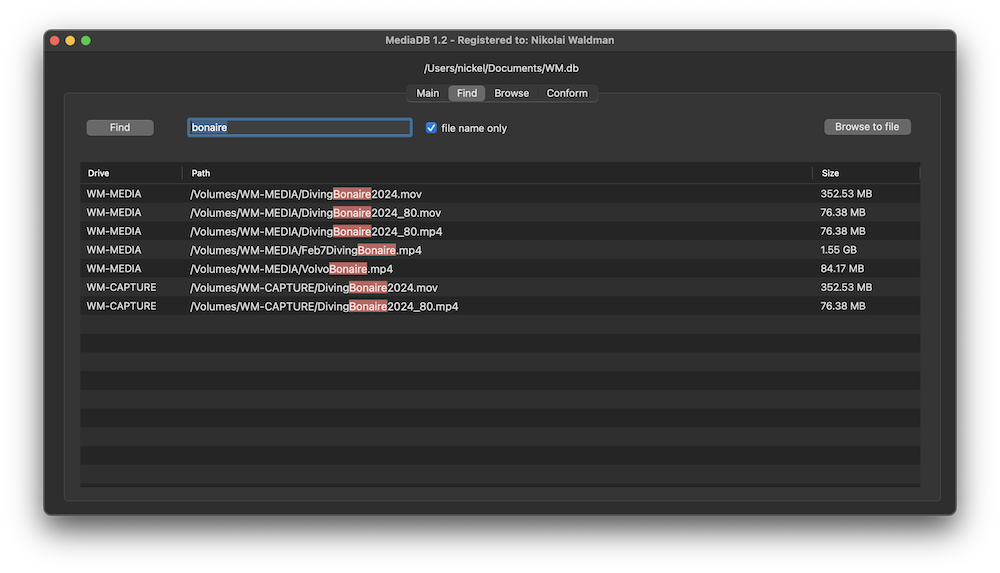
Search files without the drive

Use MediaDB to find a file when you need it without connecting any drives to your computer.

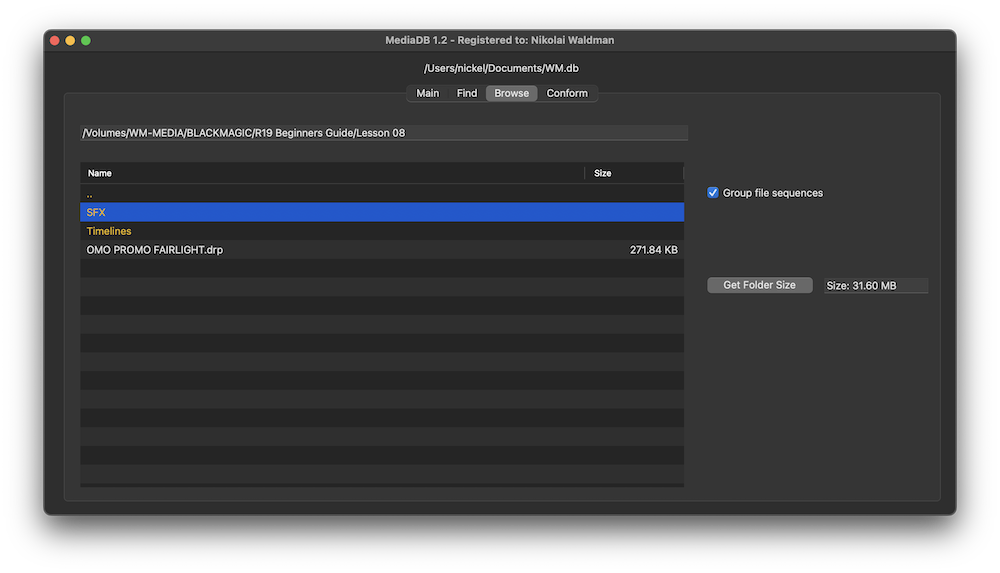
Group file sequences

When selected, each file sequence will be presented in the format filename[start-end].extension


Get Folder Size

Select a folder and press the “Get Folder Size” button to calculate the size of all folders and files recursively.

Conform

Import an EDL from any NLE with full reel names (e.g. File_129), and MediaDB will find the files and tell on which drives they are on. It will also create an RCP file, which you can then use with Resolve Collect to copy all the files.

Use cases of MediaDB

Film Editors working on multiple projects often need to use multiple discs to store source footage and other assets. Rather than connecting hard drives to the computer and trying to find the correct file, MediaDB can easily locate the file. A quick search in the app is enough to find the necessary file and locate the correct disc. This is especially useful if the archive includes SD cards, USB sticks, and other virtual drives.

Izvēlieties savu licenci

We offer three types of licenses. The single-user license is ideal for freelancers who want to use the software on one or two computers. This license is tied to a single account. For companies, we offer a team license, which is bound to the company. The number of licenses can be chosen upon purchase, with a minimum of three licenses. We also offer an enterprise option. Please contact our sales team for more information. All licenses are perpetual.

Pirms pirkuma iesakām pieteikties, lai nodrošinātu ērtu piekļuvi turpmākajiem spraudņa atjauninājumiem.
Viena lietotāja licence
loading...
Team License (3+ users)
loading...
Lai iegūtu Enterprise licenci, lūdzu, sazinieties ar mūsu pārdošanas komandu.

Lūdzu, ņemiet vērā: pats spraudnis pašlaik ir pieejams tikai angļu valodā.

Jūs tiksiet novirzīts uz drošo "Paddle" apmaksas lapu. Paddle.com ir Merchant of Record.

Apgrieztā maksāšana: Ja pērkat uzņēmuma vajadzībām un jums ir PVN numurs, dažās valstīs varat izmantot apgrieztās maksāšanas procedūru. Norēķinu lapā pēc valsts un pasta indeksa izvēles kreisajā pusē noklikšķiniet uz "Add VAT ID".

Bundle

Resolve Collect and MediaDB

25% off
Pirms pirkuma iesakām pieteikties, lai nodrošinātu ērtu piekļuvi turpmākajiem spraudņa atjauninājumiem.

Atbalsts

Ja jums ir kādi jautājumi vai funkciju pieprasījumi, sazinieties ar mūsu atbalsta komandu. Mēs labprāt jums palīdzēsim!

BIEŽĀK UZDOTIE JAUTĀJUMI

Pēc lejuplādēšanas izpakojiet zip failu un palaidiet .pkg failu. Pēc tam vienkārši izpildiet instalēšanas vedņa norādījumus.

From the app menu, select File > Register. Enter your license key in the "Key" field.

To remove a license from a device, choose File > Register from the app menu. Click on "Remove License".

You can save the database file to a server and connect to it there. However, be aware that the connection speed will be much slower. For the best speed, it’s better to have one master database file that you distribute to all the machines that need to access it.

Jā, ja ir pieejami atjauninājumi, varat tos lejupielādēt bez maksas.

Nē, šī lietojumprogramma darbojas bezsaistē, un tajā netiek kopīgoti nekādi jūsu projekta dati tiešsaistē.

Šī lietotne tiek atbalstīta tikai operētājsistēmā macOS.

Varat vienkārši izdzēst .app failu no datora.

Ja jums ir nepieciešama kāda lietotnes funkcija, jauna opcija vai pielāgota versija, lūdzu, sūtiet mums ziņu. Mēs piedāvājam pielāgotus risinājumus jūsu uzņēmumam.

Nikolai Waldman leads development for this app, which is published and distributed via EditingTools.io.