Mūzikas cue lapa

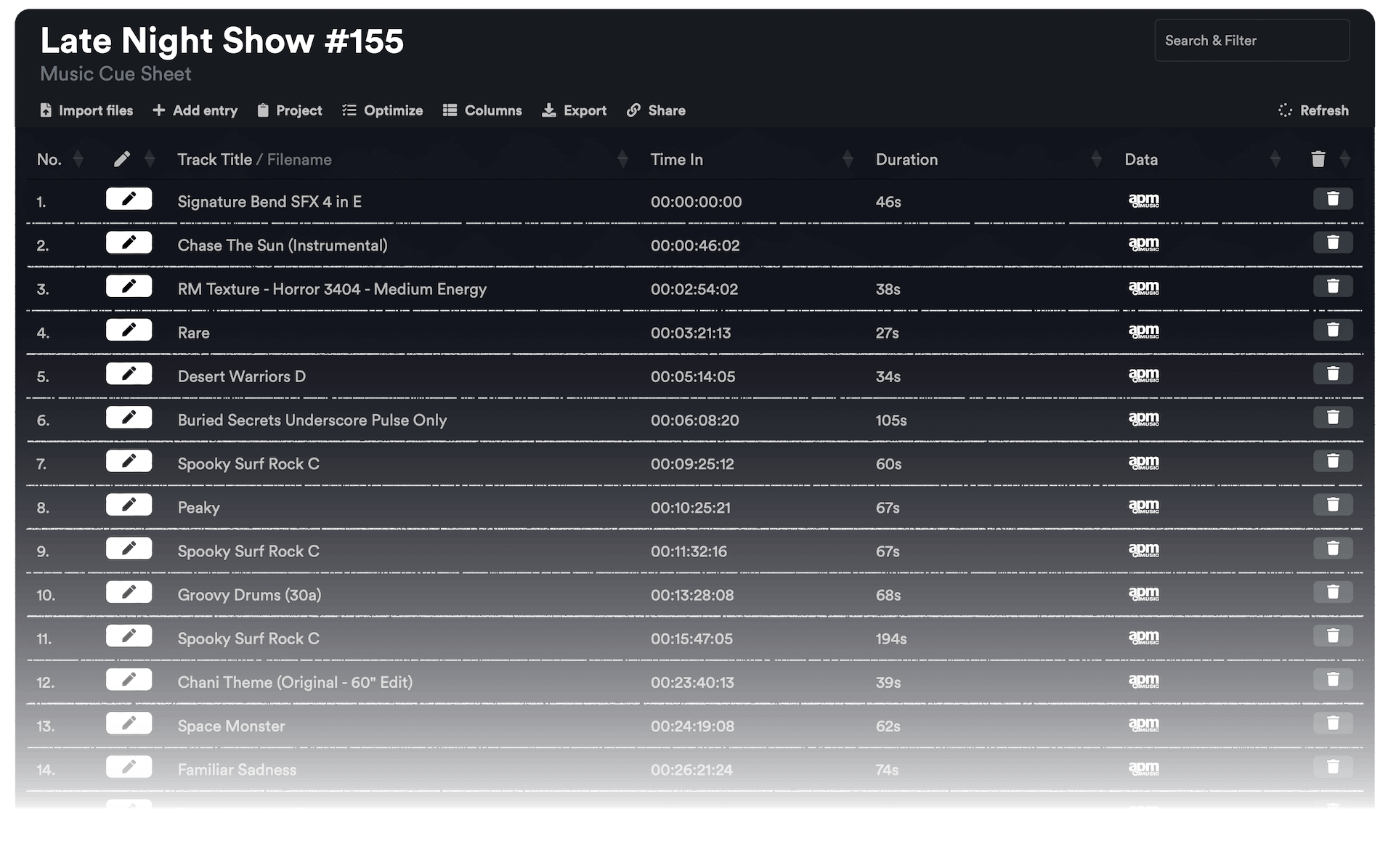
No rediģēšanas secības ģenerējiet tīru mūzikas cue lapu ar laika kodiem, ilgumu un dziesmu metadatiem. Augšupielādējiet XML vai EDL failu un ģenerējiet CSV, XLSX, PDF, TXT vai citus formātus, ko izmantot Google Sheets, Microsoft Excel, Apple Numbers un līdzīgās programmās.

Kadru ātrums
Eksportēt
Sākotnējie iestatījumi
Warning! This preset only works for XLSX (Excel) exports.
Frame handles

Choose the music libraries that you want to check for more metadata:


tiek gatavots...

We created this tool to save you time!

30.000+

cue sheets created

1.500.000+

audio clips processed

15.000.000+

track metadata records

Ko šis rīks dara?

Cue lapu ģenerators ātri izveidos vienkāršu sarakstu ar visiem projektā izmantotajiem mūzikas ierakstiem. Šis rīks var nolasīt sekvences no Media Composer, Premiere Pro, Resolve un Final Cut Pro. Tas apvieno vairākus celiņus un novērš neredzamus izgriezumus, lai iegūtu tīru sarakstu. Pamatojoties uz failu nosaukumiem, mūzikas celiņu metadatus var arī automātiski pievienot cue lapai, ja tie nāk no kādas no mūsu partneru bibliotēkām. Eksportu var pielāgot, izmantojot iepriekš iestatītus iestatījumus, un eksportēt daudzos dažādos formātos, tostarp CSV, XLSX un PDF.

Kādus failu formātus varu augšupielādēt?

  • EDL - Edit Decision List (.edl)
  • XML - Final Cut 7 XML (.xml)
  • XML - Extensible Markup Language (.xml) (Avid Media Composer)
  • TXT - Avid Pro Tools TXT -> Sesijas informācija kā teksts (.txt)
  • FCPXML - Final Cut Pro X (.fcpxml)
  • CSV (comma or semicolon separated) (.csv)
  • AAF - Advanced Authoring Format (.aaf) → only in our Cue Sheet Manager for Pro Users

Scan production music libraries for metadata

By partnering with over 20 production music libraries, the tool is able to automatically pull metadata for tracks from these libraries. The metadata contains not only the track name and artist but also details about the label, publisher, composer details, and shares. Please note that the available metadata depends on the library.

Pārbaudiet mūziku no bibliotēkām, kas sadarbojas ar mums, un atvieglojiet savu darbu, izmantojot šo bibliotēku dziesmas.


Vai jums trūkst bibliotēkas vai jūs strādājat mūzikas bibliotēkā? Sazinieties ar mums un kļūstiet par partneri, lai jūsu klienti varētu izmantot mūsu rīku. Kļūšana par partneri ir vienkāršs un vienkāršs process.

Metadati tiks pievienoti, izmantojot failu nosaukumus. Lai pārliecinātos, ka visas dziesmas tiek atpazītas, pēc lejupielādes nevajadzētu mainīt failu nosaukumu. Mēs neuzņemamies juridisku atbildību par datu precizitāti. Jums pašam ir pienākums pārbaudīt savas cue lapas pareizību.
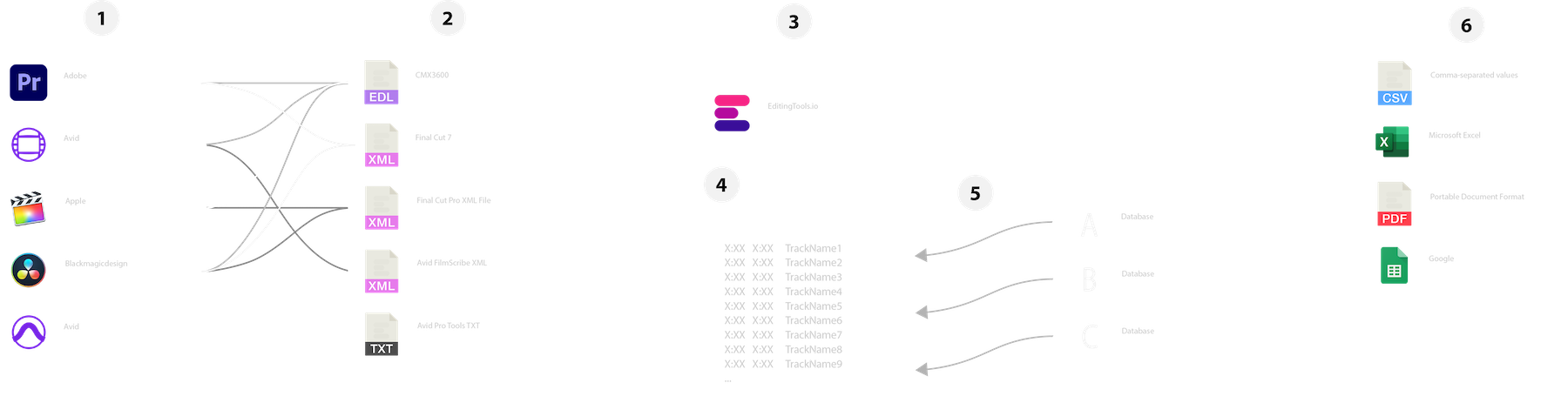
The workflow in detail

Learn how this cue sheet tool works.

There are 6 simple steps you can follow to get the best workflow results:

  1. Prepare the sequence for which you want to create a cue sheet. It is best to make a copy and clean up the tracks, removing clips that do not belong there. It is a good idea to collect all the cues on 2 or 3 tracks and export only those tracks.
  2. Depending on the software you are using, you can export an EDL, XML or ProTools Session TXT. If you are using Adobe Premiere Pro or DaVinci Resolve, we recommend that you export a Final Cut 7 XML.
  3. Upload your sequence to our Music Cue Sheet Tool and choose your desired settings. The tool will analyze your sequence and create a sorted track list.
  4. The track list calculates the duration of each clip. Depending on your settings, similar clips are grouped together.
  5. If you enable the "Include metadata from music libraries" option and select the libraries from which you used music, the tool will check for additional metadata in those libraries. The information is pulled from data provided directly by our library partners via API or shared database. This includes information about the music album, the composer and artist up to library codes and label names.
  6. Once all the information is collected, it is exported to the file format of your choice. The recommended export format is CSV, which contains all the data you need and can be easily edited using Excel, Numbers, or Google Sheets.

Sagatavojiet savu secību

Pirms sekvences augšupielādes ieteicams to ātri sagatavot. Vislabākais veids, kā to izdarīt, ir dublēt sekvenci un noņemt visus nevajadzīgos audio un video celiņus, kurus nevēlaties, lai tie būtu jūsu cue lapā. Svarīgi ir arī izlīdzināt visus celiņus, ja izmantojat iesaiņotus/iekļautus audio klipus. Noņemiet arī "Audio pārejas efektus", ja rīks nedarbojas.

Salikt pārklājošos identiskus klipus

Ja šī opcija ir iespējota, klipi, kas secībā ir sagriezti vairākos gabalos, tiek automātiski apvienoti vienā ierakstā, ja starp tiem nav pārtraukuma. Ja rīks atrod vienu un to pašu klipu vairākos ierakstos, tie arī tiks apvienoti un parādīti kā viens ieraksts.

Izmantojiet rāmja rokturus, lai atrastu un apvienotu identiskus klipus

Izmantojot šo opciju, varat savienot klipus pat tad, ja starp tiem ir atstarpe. Varat noteikt aptveramo kadru diapazonu no 1 līdz 500 kadriem. Ja rīks atrod vienu un to pašu klipu vairākos ierakstos, tie arī tiks apvienoti un parādīti kā viens ieraksts.

Sākotnējie iestatījumi

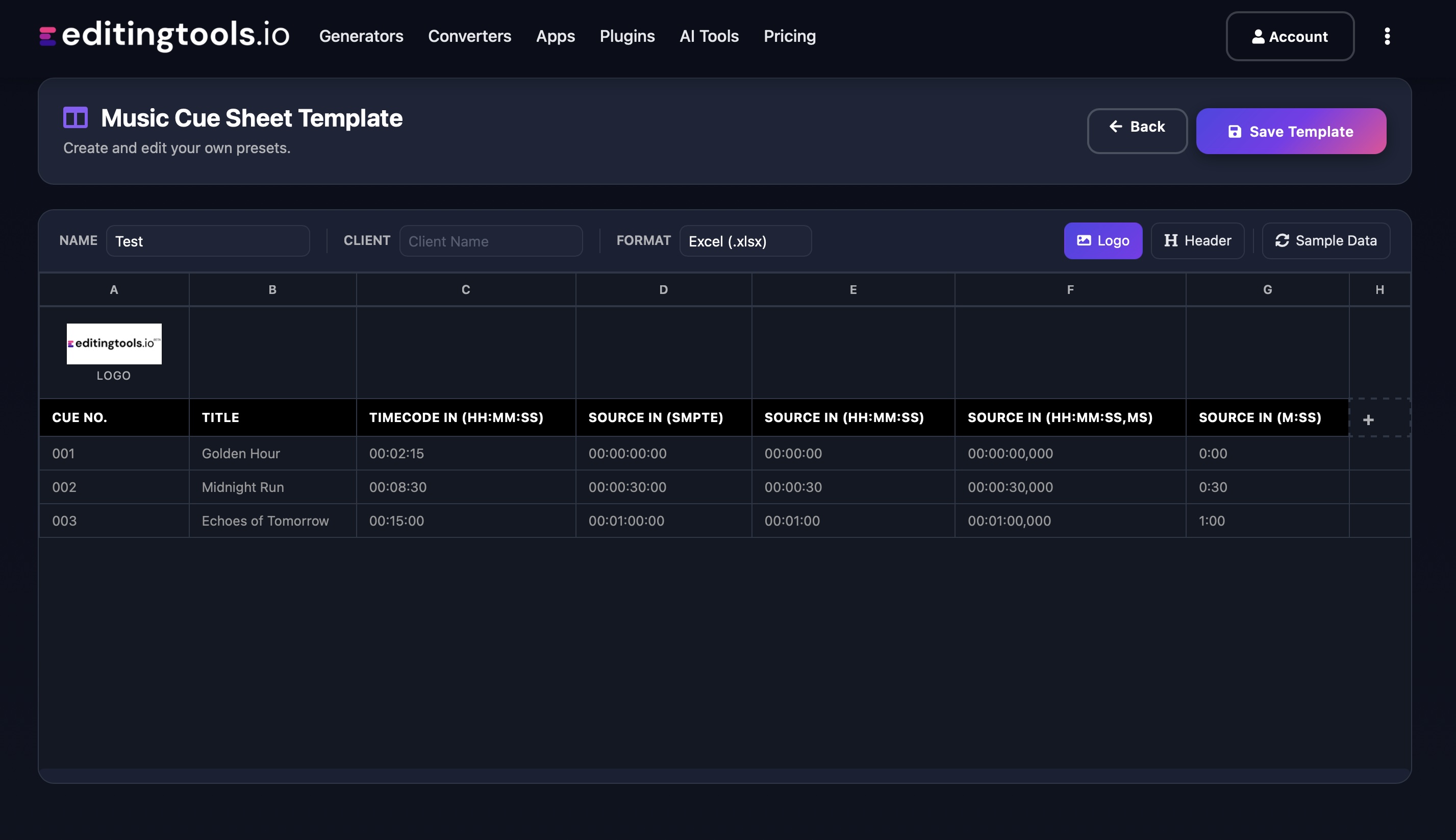
Eksporta failos varat pielāgot kolonnas. Izvēlieties kādu no vairākiem publiski pieejamajiem šabloniem vai nospiediet "+" zīmi, lai izveidotu savu priekšnoteikumu. Ir neskaitāmas iespējas, kā attēlot laika kodus, garumus un individuālos metadatus. Lai saglabātu iestatījumus, ir jābūt pieteicies.

Need more? Check out our Music Cue Sheet Manager.

Key Features

  • Compatible with Media Composer, Pro Tools, Premiere Pro, Resolve, FCP and other editing software.
  • Merge tracks and remove invisible cuts automatically
  • Auto-fill metadata for over 15M+ tracks from 20+ partner libraries
  • Build and integrate your own metadata database
  • Customizable exports (CSV, Excel, CISAC & APRA)

Add metadata to your personal EditingTools database or library

Our tool supports a list of default values that can be added to the search database, which are explained below. Not all values are mandatory. Additional columns are possible.

NameTypeDescription
file_nameString (max. 200 characters)Filename up to 200 characters. If a filename is longer, it is truncated. If there are several variations of a file name, they can be listed in a column file_name_2, file_name_3, ...
track_titleString (max. 200 characters)Name of track
track_numberIntTrack number within the album.
track_durationIntTrack duration in seconds.
track_codeString (max. 100 characters)Optional track code (can include numbers and letters).
track_idIntA unique database track ID, must be numeric. Optional.
artistString (max. 200 characters)This is an optional artist name. If this value is empty, most cue sheets will automatically use the composer's values.
composerString (max. 200 characters)Composer Name. Multiple composers can be separated by a semicolon, e.g. "John Doe; John Smith".
composer_societyString (max. 200 characters)Name of the Composer Society. If a track has multiple composers, use semicolons to separate the societies.
composer_numberString (max. 200 characters)Number of the Composer. If a track has multiple composers, use semicolons to separate the number.
composer_shareString (max. 200 characters)Share of the Composer. If a track has multiple composers, use semicolons to separate the shares. Value between 1 and 100.
ownerString (max. 200 characters)
publisher
publisher_name
String (max. 200 characters)Publisher Name. Multiple publishers can be separated by a semicolon, e.g. "Pub1;Pub2".
publisher_societyString (max. 200 characters)Name of the Publisher Society. If a track has multiple publishers, use semicolons to separate the societies.
publisher_numberString (max. 200 characters)Number of the Publisher. If a track has multiple publishers, use semicolons to separate the number.
album_titleString (max. 200 characters)
album_catalog_numberInt
album_catalog_codeString (max. 200 characters)
album_release_dateDate (YYYY-MM-DD)Album release date. Leave blank if unknown.
album_disk_numberIntOptional disk number of the album.
album_total_discsString (max. 200 characters)Total number of disks in an album.
label_nameString (max. 200 characters)Name of the label.
label_codeIntLabel code, without "LC".
isrcString (max. 100 characters)
iswcString (max. 100 characters)
eanString (max. 100 characters)
upcString (max. 100 characters)
gemaString (max. 100 characters)
catalog_nameString (max. 200 characters)Name of the catalog/library the track is in.
bpmInt
genreString (max. 200 characters)

Ātrie ceļveži

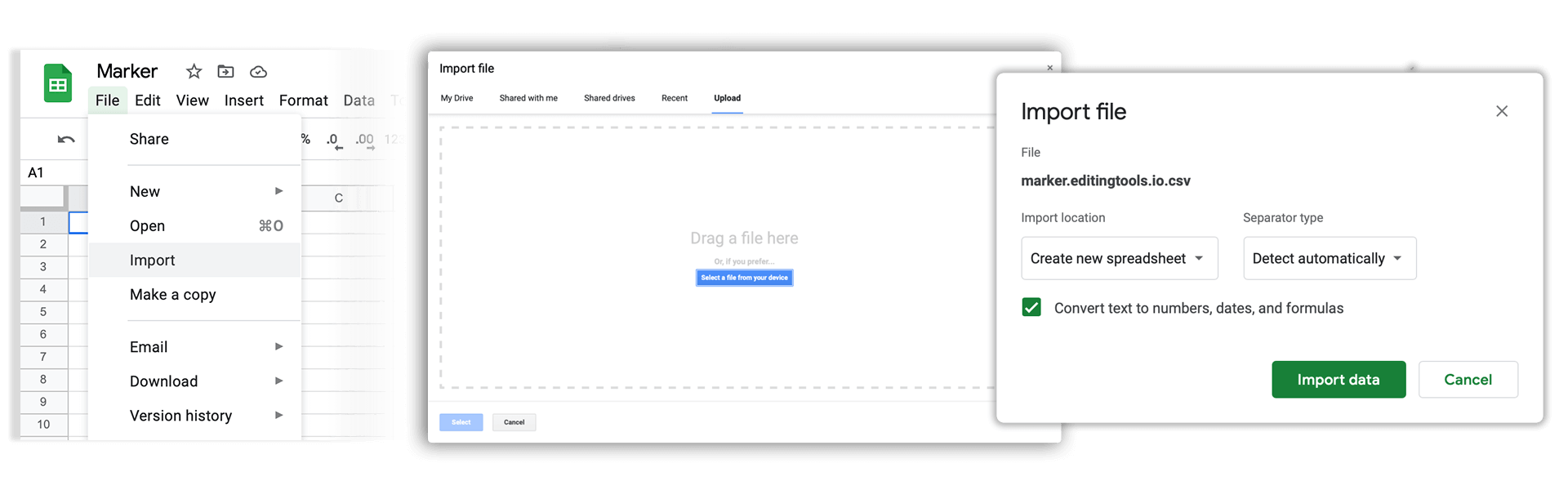
How do I import a csv file into Google Sheets?

Open Google Sheets and go to "File → Import". Upload the generated CSV file and press "Import Data" to generate a Sheet.

How do I import a csv file into Apple Numbers?

Open Numbers and go to "File → Open". Simply open the CSV file.

Atbalsts

Ja jums ir kādi jautājumi vai funkciju pieprasījumi, sazinieties ar mūsu atbalsta komandu. Mēs labprāt jums palīdzēsim!

BIEŽĀK UZDOTIE JAUTĀJUMI

No, you still need to send out the final cue sheet. This tool will only help you to create them more quickly.

In order to upload AAF files, you will need a PRO account and to use our Cue Sheet Manager.

Our Cue Sheet Manager allows to edit entries.

Automate your workflows with our API

Whether you're a developer or just want to automate more processes with tools like Zapier or Make, you can easily integrate this tool into your workflows with our API. Learn more about integrating the REST API in our API documentation.

API Documentation