1. Export a CSV marker file from Pix
Open the comments panel on the right side in Pix. Press the three dots and select "Export". Now you can then download the CSV file from Pix.
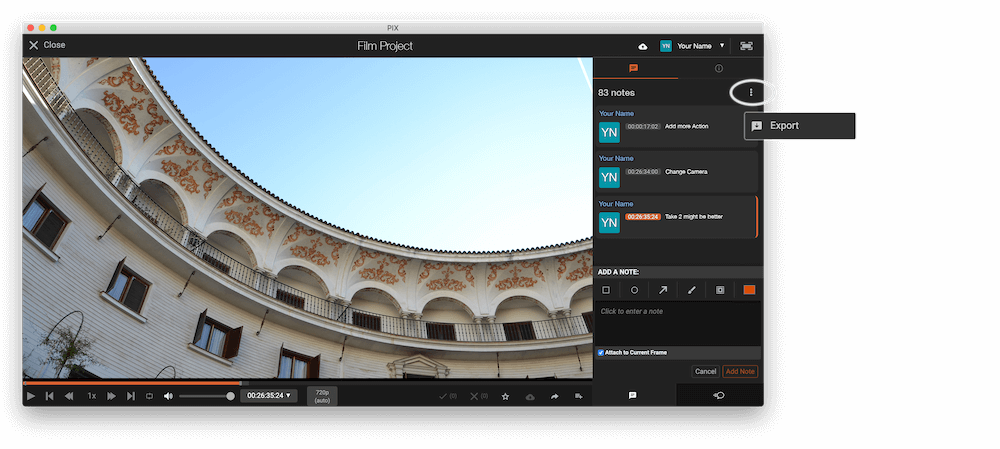
The timecode in Pix starts with 00:00:00:00 for each clip, so you may need to use the offset function on EditingTools.io to sync it with you timeline or move it manually in your NLE (editing software).
2. Use the "Marķējuma pārveidotājs" to convert the CSV marker file into a SRT subtitle file
Open the free Marķējuma pārveidotājs, select "Pix Systems > Comments (.csv)" and set "convert" to "SRT". Generate and download the file. Ja jums ir problēmas ar faila konvertēšanu, varat sazināties ar bezmaksas atbalsta dienestu.
3. Import the SRT subtitle file into DaVinci Resolve
To import subtitles go to "Files -> Import -> Subtitle...". Select the subtitle file and import. You can now drag and drop the subtitle file from the Media Pool into your timeline.
🚀 Gatavs
Pagaidām tas arī viss! Ja šī pamācība jums noderēja, lūdzu, dalieties ar to, lai mūs atbalstītu. Ja jums ir ieteikumi, kā mēs varētu uzlabot darbplūsmu, lūdzu, dariet mums zināmu!